
AI Coding Agents in 2026: How Developers Actually Use Claude Code, Codex & Copilot
A practical engineering guide to AI coding agents in 2026 — how they differ from autocomplete, how to use Claude Code, Codex, and GitHub Copilot in real workflows, and why human supervision still matters.

Yash Nandvana
Full Stack Developer
Introduction
For years, AI-assisted coding meant one thing: smarter autocomplete. Tools predicted the next line, maybe the next function. You typed; the model guessed.
That model has fundamentally changed.
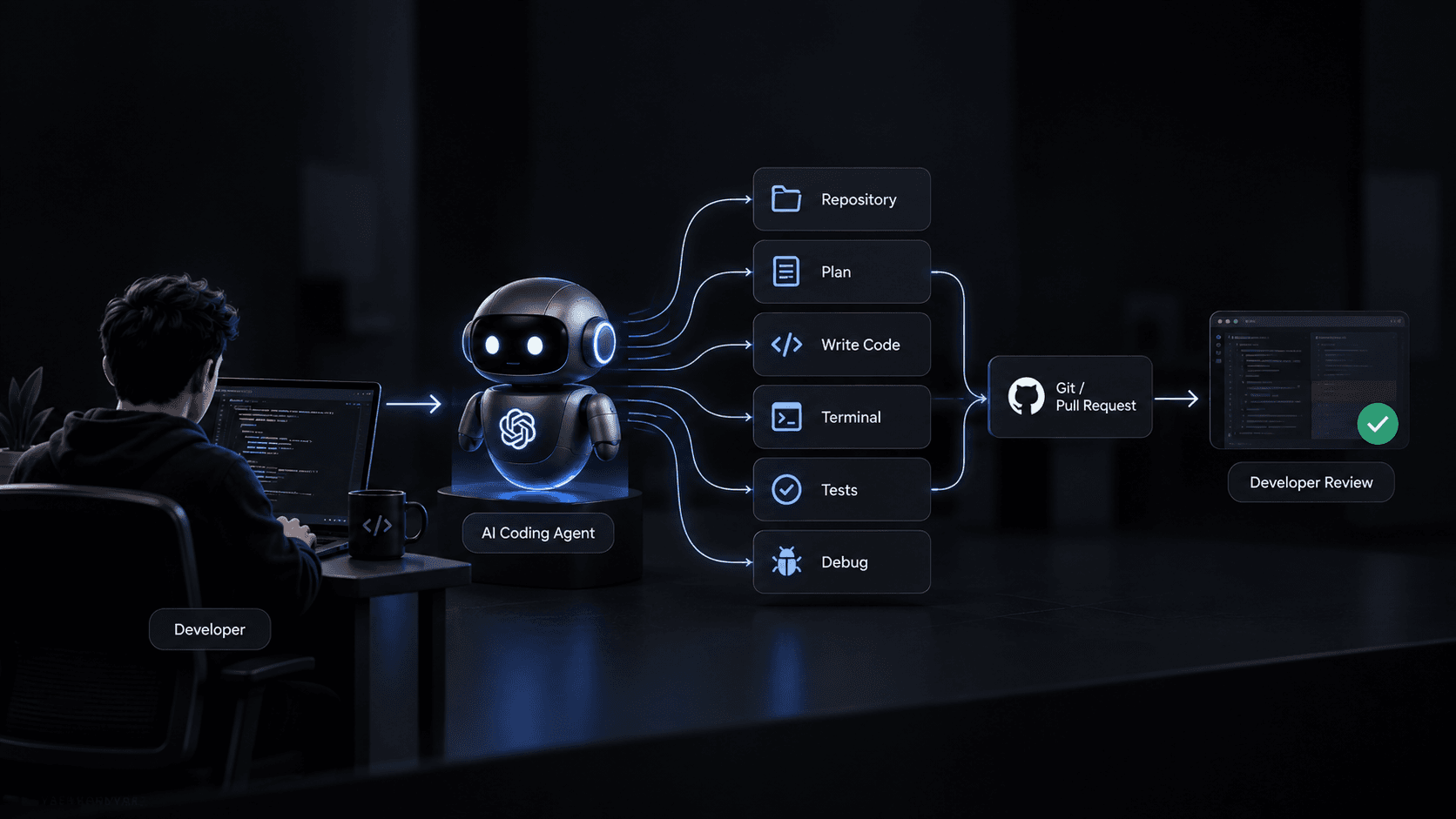
Modern AI coding tools have crossed into a different category — they are agents. They can be given a task, explore a codebase independently, propose a plan, write code across multiple files, execute commands in the terminal, read test output, fix failures, and open a pull request. The developer's role in that loop is increasingly about defining, directing, and reviewing — rather than typing every line.
The core loop looks something like this:
Developer defines task
        ↓
Agent understands the repository
        ↓
Agent analyzes existing architecture
        ↓
Agent proposes a plan
        ↓
Agent modifies files
        ↓
Agent runs tests or commands
        ↓
Agent reads errors
        ↓
Agent fixes problems
        ↓
Agent reviews implementation
        ↓
Agent prepares commit / PR
        ↓
Developer reviews and approves
This is not "give AI your whole project and walk away." The agent makes mistakes. It misunderstands requirements. It introduces subtle regressions. Human review at every meaningful step is not optional — it is what separates productive agentic development from a chaotic mess of AI-generated bugs committed to main.
But when used well, this shift in workflow has real implications for how professional developers structure their time, their tasks, and their architecture decisions.
1. What Is an AI Coding Agent?
Before comparing tools, it is worth being precise about terminology. These three categories are not the same thing:
| Feature | Autocomplete | AI Assistant | AI Coding Agent | |
|---|---|---|---|---|
| Code completion | Line / block | Function / file | Multi-file, multi-step | |
| Repository understanding | None | Limited / single file | Full repository context | |
| Multi-file changes | No | Sometimes | Yes | |
| Terminal access | No | No | Yes | |
| Test execution | No | No | Yes | |
| Debugging loop | No | No | Yes | |
| Planning | No | Sometimes | Yes | |
| Tool usage | None | Limited | File system, shell, git, APIs | |
| Git / PR workflow | No | No | Yes | |
| Human supervision | Minimal | Important | Critical |
An AI coding agent is a system that can reason through a multi-step engineering task, use development tools (file system, shell, git), observe the results of its own actions, and iterate until the task is complete or until it needs human input. The key word is iterate — the agent is not generating a one-shot answer. It is running a feedback loop.
That distinction changes everything about how you should use it.
2. Claude Code vs. Codex vs. GitHub Copilot
These three tools are the most widely used as of 2026. They overlap significantly, but they have different strengths and different workflows.
| Feature | Claude Code | OpenAI Codex | GitHub Copilot | |
|---|---|---|---|---|
| Primary use case | Agentic, full-repo engineering tasks | Agentic coding via CLI and API | IDE-embedded assistant & agent | |
| Repository-level work | Strong — designed for this | Strong | Strong (Copilot Workspace) | |
| Terminal / CLI workflow | Native CLI agent | Native CLI agent | Agent mode (IDE-integrated) | |
| IDE integration | Terminal-first; IDE plugins available | Terminal-first; IDE integration available | Deep IDE integration (VS Code, JetBrains) | |
| Agentic coding | Core capability | Core capability | Growing via Copilot Workspace | |
| Debugging | Strong, iterative | Strong, iterative | Improving | |
| Refactoring | Excellent | Good | Good | |
| Code generation | Excellent | Excellent | Excellent | |
| Testing | Strong | Strong | Good | |
| Git workflow | Integrated | Integrated | Integrated via IDE/Workspace | |
| Best suited for | Engineers who prefer CLI/terminal workflows | Engineers comfortable with terminal-based agents | Developers already in VS Code or JetBrains | |
| Strengths | Long context, nuanced reasoning, careful planning | Speed, strong multi-language support, API-first | Seamless IDE experience, low setup friction | |
| Limitations | Slower than Copilot for simple inline suggestions | Less native IDE integration | Agent mode less mature than CLI-native tools |
Important note: None of these tools is definitively "the best." The right choice depends on your workflow preferences. If you live in the terminal and want an agent that can operate across your entire codebase with minimal setup, Claude Code and Codex fit that model well. If you prefer staying in VS Code with inline suggestions and an integrated agent, Copilot is the more natural fit.
They also evolve quickly. Capabilities that distinguished one tool six months ago may have been matched by its competitors today. Always check current official documentation from [Anthropic](https://docs.anthropic.com), [OpenAI](https://platform.openai.com/docs), and [GitHub](https://docs.github.com/en/copilot) rather than relying on benchmark articles.
3. How Developers Actually Use AI Coding Agents
This is the part most articles skip. Not "what can these tools do in theory" — but how a real engineering workflow actually uses them.
Step 1 — Give the Agent Context
Before asking an agent to do anything, make sure it understands the codebase. A good starting prompt:
"Before making any changes, explore this repository. Identify the framework, database layer, authentication approach, API structure, test setup, and any unusual patterns or conventions. Do not modify any files. Return your understanding."
This matters because agents without context make assumptions. Those assumptions get embedded in generated code, sometimes silently. A few minutes of context-gathering saves hours of untangling later.
Step 2 — Ask for a Plan Before Implementation
Once the agent understands the repository, ask it to plan before acting:
"Analyze the issue described in this ticket and propose a detailed implementation plan. Identify which files will need to change, what new files (if any) should be created, whether there are database migrations required, and any risk areas. Do not modify files yet."
Planning first forces the agent to surface its assumptions early. If the plan is wrong, you catch it before any code is written. If the plan looks good, you have a shared understanding before implementation starts.
Step 3 — Implement in Small, Scoped Steps
Large vague prompts produce large vague results.
Bad:
"Build the entire authentication system."
Better:
"Implement the password reset endpoint. First inspect the existing authentication service in /src/services/auth.service.ts and the current database schema. Then propose the implementation and wait for my confirmation before writing any code."The second approach is safer because it is scoped, it starts with inspection, and it requires human confirmation before changes land. Large AI-generated changesets are harder to review and harder to revert.
Step 4 — Let the Agent Run Tests
The agent becomes substantially more useful when it can observe the results of its own changes. A test-driven loop looks like this:
Agent writes code
        ↓
Agent runs: npm test / pytest / cargo test
        ↓
Agent reads test output
        ↓
Agent identifies root cause of failures
        ↓
Agent applies fix
        ↓
Agent re-runs tests
        ↓
Tests pass → Agent reports completion
Without this feedback loop, you are reviewing a static code diff. With it, you are reviewing code that has already been iterated against your actual test suite. The signal quality is dramatically different.
Step 5 — Review the Diff
This step is non-negotiable.
Before accepting any agent-produced changes, review:
package.json, requirements.txt, etc.AI-generated code is still code. It needs code review. The fact that an AI wrote it is not a reason to skip this step — if anything, it is a reason to be more careful, because AI-generated code can contain subtly wrong logic that passes tests but fails in production edge cases.
Step 6 — Create a Clean Commit or PR
The agent can help prepare:
But the developer should still verify that the described changes match the actual diff. AI-generated PR descriptions can sound confident while quietly omitting important details.
4. Real Example: Building a Feature With an AI Coding Agent
Let's walk through a realistic scenario.
Stack: Next.js + Node.js + TypeScript + PostgreSQL + Prisma + REST API
Task: Add a paginated, filterable search endpoint for the product catalog
Note: This is a structured example to illustrate the workflow, not a transcript of a real session.
Stage 1 — Understand the existing data model
Prompt:
"Inspect the Prisma schema and identify how products are currently modeled. Note all filterable fields, existing indexes, and how pagination (if any) is currently handled across the API. Do not make any changes."
Agent reads prisma/schema.prisma, identifies the Product model fields (name, category, status, createdAt), notes there are no full-text search indexes, and spots that other list endpoints use simple findMany with no cursor-based pagination.
Stage 2 — Propose schema changes
Prompt:
"The search endpoint needs to filter by category, status, and a keyword match on name. Propose any Prisma schema changes needed (indexes, new fields) to make this efficient. Do not modify files yet."
Agent proposes adding a compound index and a generated tsvector column for full-text search:
model Product {
  id          String   @id @default(cuid())
  name        String
  description String?
  category    String
  status      String   @default("active")
  createdAt   DateTime @default(now())
  updatedAt   DateTime @updatedAt

  // Proposed additions
  @@index([category, status])
  @@index([createdAt(sort: Desc)])
}
Developer reviews — confirms the indexes make sense for the filter pattern, approves.
Stage 3 — Generate migration
Prompt:
"Run npx prisma migrate dev --name add_product_search_indexes and show me the SQL it generates before applying."Agent runs the command, returns the SQL:
-- CreateIndex
CREATE INDEX "Product_category_status_idx" ON "Product"("category", "status");

-- CreateIndex
CREATE INDEX "Product_createdAt_idx" ON "Product"("createdAt" DESC);
Developer confirms the SQL is safe, agent applies the migration.
Stage 4 — Implement the search endpoint
Prompt:
"Implement GET /api/products/search. It must accept query params:q(keyword, optional),category(optional),status(optional, default 'active'),page(number, default 1),limit(number, default 20, max 100). Follow the existing controller/service pattern in/src/controllers/. Use the existing auth middleware. Validate all query params — return 400 for invalid inputs."
Agent inspects existing controllers, matches the pattern, and creates:
// src/services/product-search.service.ts

import { prisma } from '../lib/prisma';

interface SearchParams {
  q?: string;
  category?: string;
  status?: string;
  page: number;
  limit: number;
}

export async function searchProducts({ q, category, status = 'active', page, limit }: SearchParams) {
  const skip = (page - 1) * limit;

  const where = {
    status,
    ...(category && { category }),
    ...(q && {
      name: { contains: q, mode: 'insensitive' as const },
    }),
  };

  const [total, products] = await prisma.$transaction([
    prisma.product.count({ where }),
    prisma.product.findMany({
      where,
      orderBy: { createdAt: 'desc' },
      skip,
      take: limit,
      select: { id: true, name: true, category: true, status: true, createdAt: true },
    }),
  ]);

  return {
    data: products,
    meta: {
      total,
      page,
      limit,
      totalPages: Math.ceil(total / limit),
    },
  };
}
Stage 5 — Run tests and iterate
Prompt:
"Run the existing test suite. If any tests fail, identify the cause and fix them. Report which pass and which fail."
Agent runs npm test, identifies a failing test in the product fixture — the test database seed was missing the status field which now has a NOT NULL constraint. Agent fixes the seed file, re-runs. All tests pass.
Stage 6 — Review diff
Developer runs git diff main, checks:
$transaction for count + data in a single round-trip — goodmode: 'insensitive' on the keyword match — correct for PostgreSQLselect clause avoids over-fetching — goodlimit > 100 — confirmedApproves. Agent prepares commit message and PR description.
5. Where AI Coding Agents Are Extremely Good
Certain categories of work are consistently well-handled by current agents:
These areas share a common trait: they are well-defined, have clear right answers, and have observable success criteria. The agent can check its own work against the test suite, the type checker, or the linter. That feedback loop is what makes it effective.
6. Where AI Coding Agents Still Struggle
This section matters as much as the previous one — maybe more.
Ambiguous requirements. If the requirement is unclear, the agent will pick an interpretation and implement it confidently. It will not always tell you it is guessing.
Hidden business rules. Agents do not know that your pricing logic has a special case for wholesale accounts that is not documented anywhere. It is in the legacy code and in the heads of three engineers who were there in 2019.
Large architectural decisions. Choosing between event-driven and request-driven architecture, microservices vs. monolith, or synchronous vs. asynchronous processing requires understanding trade-offs that extend far beyond the current codebase state.
Security-sensitive implementation. Authentication flows, authorization logic, cryptographic operations, and permission models require careful, deliberate design. Agents can produce plausible-looking code that has subtle security flaws.
Complex distributed systems. Race conditions, eventual consistency, distributed transactions, and failure modes in multi-service architectures require reasoning that current agents handle inconsistently.
Poorly documented legacy code. When the codebase has undocumented side effects, implicit ordering dependencies, or global state mutations scattered across modules, the agent may change something that breaks behavior in a seemingly unrelated part of the system.
Over-engineering. Agents sometimes introduce unnecessary abstractions, extra layers of indirection, or premature generalization that adds complexity without adding value.
Passing tests ≠ correct implementation. This is worth stating directly. An agent can write code and tests together, where the tests validate the agent's understanding of the requirement — which might be wrong. Tests that pass are necessary but not sufficient evidence of correctness.
7. The Human Developer Is Still the Architect
AI agents accelerate implementation. They do not replace the need for engineering judgment.
The decisions that still require a human developer:
An agent can generate the implementation. The engineer owns the engineering decision.
This distinction is not just philosophical. In practice, it means the developer's most important skill when working with AI agents is not prompt engineering — it is the ability to evaluate the output. You cannot meaningfully review code you do not understand.
8. AI Coding Agent Workflow That Actually Works
| Stage | Developer does | Agent does | Developer verifies | |
|---|---|---|---|---|
| Understand | Define the task clearly | Explore repository, identify relevant files | Agent understood the right scope | |
| Plan | Review and approve the plan | Propose implementation plan with risks | Plan aligns with architecture, no hidden assumptions | |
| Implement | Confirm each scoped step | Write code following existing patterns | Code follows conventions, no unexpected changes | |
| Test | Confirm test approach | Run tests, read failures, iterate | Tests are meaningful, not just green | |
| Review | Review git diff carefully | Prepare diff summary | All changes are intentional and correct | |
| Refine | Identify issues in review | Apply targeted fixes | Fix is correct and does not introduce new issues | |
| Commit | Approve and merge | Prepare commit message and PR description | Commit message is accurate, PR is complete |
9. Prompting AI Coding Agents Properly
Prompting an agent is different from asking a chatbot a question. The agent has tools, memory within the session, and the ability to take actions. The quality of your prompts determines the quality of its decisions.
Give repository context first
"Before making any changes, explore this repository. Identify the framework, database layer, authentication flow, API structure, and testing setup. Return your understanding before proceeding."
Define constraints explicitly
"Do not add new dependencies without asking me first. Do not modify any files in /src/lib/auth/. Do not change the database schema without proposing the migration SQL for my review first."Tell it what NOT to change
"The existingUserServiceis working correctly — do not refactor it. Only add the newAlertService."
Ask it to inspect before modifying
"Before writing any code, read the existingProductControllerandProductServiceso you understand the pattern. Then propose how the new alert endpoints should follow that pattern."
Ask for a plan
"Analyze this feature request and propose an implementation plan. Identify all files that will change, any migration required, and any risk areas. Wait for my approval before writing code."
Work in small tasks
Prefer: "Implement only the API endpoint. Do not touch the frontend yet."
Over: "Build the entire feature end to end."
Provide acceptance criteria
"The endpoint should return 400 if the threshold is not a positive number. It should return 401 if the user is not authenticated. It should return 409 if the user already has an alert for this product."
Ask it to run tests
"After implementing the service, run npm test -- --testPathPattern=alert and report the results."Ask it to explain failures
"The test is failing with this error: [paste error]. What is the root cause and what is your proposed fix? Explain before making changes."
Ask it to review its own diff
"Before I review the changes, summarize what files you modified, what was added, what was deleted, and whether there are any risk areas I should pay particular attention to."
10. AI Coding Agents and Git
When an AI agent can modify files autonomously, Git becomes more important — not less.
Use branches. Always run agent work on a dedicated branch. Never let an agent work directly on main or production. Branch boundaries give you a clean rollback point.
Commit frequently in small units. Small commits make the git diff reviewable. A single commit containing 40 changed files across 15 directories is not reviewable in any meaningful sense.
Review diffs before committing. git diff is your primary safety net. Read it. Every time.
Keep commit messages honest. Agent-generated commit messages can be vague or describe intent rather than actual change. Verify that the message reflects what was actually changed.
Use pull requests even for solo work. The PR diff view is the clearest way to review agentic changes before they land.
Revert aggressively. If something is wrong, git revert or git reset is always available. Do not accumulate AI-generated changes you are not sure about.
Git is effectively the safety net for agentic development. The more autonomously the agent operates, the more disciplined your git hygiene needs to be.
11. AI Coding Agents and Testing
The agent + automated tests combination is substantially more powerful than either alone.
Unit tests give the agent fast, local feedback on individual functions. The agent can iterate quickly.
Integration tests reveal whether the agent's changes work in context — with the database, with other services, with real data shapes. These catch a different class of bug than unit tests.
End-to-end tests are slower but catch behavioral regressions that unit and integration tests miss. Running these before the agent considers a task complete is a reasonable requirement.
Type checking (tsc --noEmit) is fast and catches a large surface area of mistakes before tests even run.
Linting enforces style and catches common patterns the type checker misses.
The correct order when giving an agent a task:
Implement → Type check → Lint → Unit tests → Integration tests → ReviewOne important caveat: tests themselves can be wrong or incomplete. An agent that writes both the implementation and the tests can produce tests that validate its own misunderstanding of the requirement. Review tests independently of the implementation — ask whether they actually test the right behavior.
12. Security Risks of AI Coding Agents
This is not a reason to avoid using agents. It is a reason to understand the risks and mitigate them deliberately.
Secrets and credentials. Agents can read files in the repository. If your .env file is in the working directory (and it often is during development), the agent has access to your database credentials, API keys, and tokens. Never use production credentials in environments where an agent operates.
Dependency installation. An agent that can run shell commands can run npm install or pip install. Review all new dependencies before they are installed. Supply chain attacks via malicious packages are a real risk.
Arbitrary terminal commands. Review every shell command the agent proposes before it executes. A malformed command can delete files, overwrite data, or expose information.
Database operations. Be especially cautious about agents running database migrations or direct SQL in any environment with real data. Use a local or staging database for agent work, never production.
Prompt injection. Malicious content in files the agent reads — code comments, documentation, configuration values — can potentially influence agent behavior. Be aware when working with repositories from untrusted sources.
Excessive permissions. Give the agent the minimum permissions it needs. If it only needs to read and write files in /src, it does not need access to your deployment credentials.
Practical safety checklist:
npm install / pip install.env files to repositories where agents operate13. The New Developer Workflow
The distribution of developer time is shifting. Not the total time — the allocation within it.
Traditional workflow:
Understand requirement
        ↓
Research approach
        ↓
Write code
        ↓
Debug
        ↓
Write tests
        ↓
Review
AI-assisted workflow:
Understand requirement
        ↓
Define architecture and constraints
        ↓
Agent-assisted implementation
        ↓
Automated testing (agent-assisted)
        ↓
Developer review
        ↓
Targeted iteration
        ↓
Commit
In practice, developers using agents well tend to spend more time on:
And less time on:
The shift is not from "hard work" to "easy work." It is from implementation-heavy work to judgment-heavy work.
14. Will AI Coding Agents Replace Developers?
No, not in the meaningful sense that this question usually implies.
AI will continue to automate portions of software development — boilerplate, repetitive patterns, routine bug fixes, documentation. That is already happening and will accelerate.
What it is much less capable of replacing is the engineering judgment that makes software systems correct, secure, maintainable, and aligned with real user needs. That judgment requires:
The valuable developer skill is shifting — not disappearing. The shift is from:
"How fast can you write code?"
toward:
"How well can you design, direct, verify, and maintain software?"
Developers who understand systems deeply — who can evaluate agent output critically and catch the mistakes before they reach production — are more valuable in this environment, not less.
15. My Recommended AI Coding Agent Workflow
Before coding:
main.During coding:
After coding:
git diff and read every changed file.Conclusion
AI coding agents are not simply faster autocomplete. The architecture of how developers produce software is changing.
The old model was linear: developer understands, developer writes, developer tests, developer ships. Every line was typed by a human.
The emerging model is collaborative: developer defines the problem and the constraints, agent proposes and implements, developer reviews and directs. Lines of code are less the unit of developer output than they used to be.
The strongest developers in this environment are not necessarily those who generate the most code. They are the developers who understand systems deeply enough to use AI effectively without blindly trusting it — who can catch the subtle mistake in the agent's migration, spot the security gap in the generated auth flow, and recognize when the agent's confident implementation is solving the wrong problem entirely.
That kind of judgment is not automated. It is built from understanding systems, architectures, failures, and trade-offs at a depth that requires genuine engineering experience.
The tools are genuinely useful. Use them. But own the engineering.
Next Recommended Reads
Yash Nandvana• Full Stack Developer
Full Stack & Shopify Developer building scalable web apps, developer tools, and AI solutions.
Learn more about YashRelated Articles
Shopify Webhooks: A Complete Guide for Developers
A comprehensive, production-tested guide to Shopify webhooks: HMAC signature verification, raw body handling, idempotency with Redis, queue architecture, and local testing.
Shopify GraphQL Admin API: A Practical Guide for Developers
A comprehensive, production-oriented guide to Shopify's GraphQL Admin API: queries, mutations, pagination, rate limit cost calculation, userErrors checking, and bulk operations.
Building a Production-Ready REST API with Node.js, PostgreSQL & Prisma
A comprehensive architectural guide to building production Node.js backends: layer separation, Prisma ORM, PostgreSQL database design, JWT auth, input validation, and security.

